

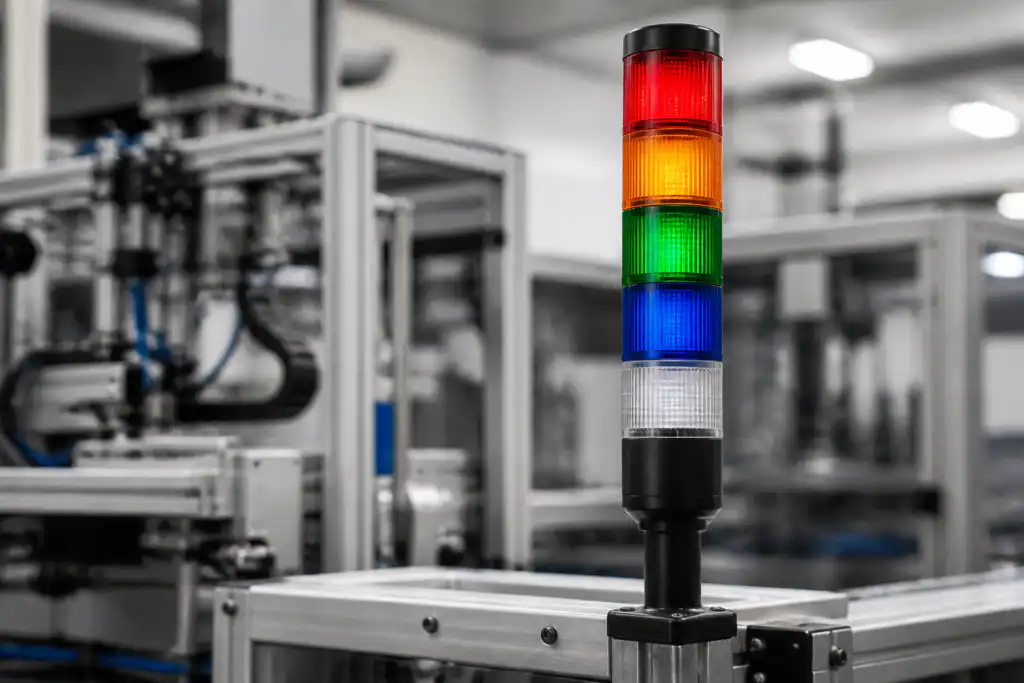
Цвета башенных индикаторов сообщают о состоянии оборудования на расстоянии, но сам по себе цвет не создает универсальной инструкции. Согласно общепринятой практике, красный цвет используется для обозначения ненормального или критического состояния, желтый (янтарный) — для предупреждения или приближения к ненормальному состоянию, зеленый — для нормальной работы, синий — для ситуации, требующей определенных действий, а белый — для нейтральной или специфической для конкретного применения информации. Проектировщик системы должен подтвердить применимый стандарт, определить каждое состояние, задокументировать режимы мигания и звуковые сигналы, а также обучить пользователей. Никогда не следует предполагать, что знакомый цвет имеет одинаковое значение на каждой машине или на каждом предприятии.
Краткий ответ: Выбор — это системное решение. Согласуйте механический интерфейс, электрический интерфейс, условия окружающей среды, реакцию человека, план технического обслуживания и применимые стандарты. Приведенные ниже примеры являются руководством по принятию решений, а не универсальными рейтингами продукции.
Как работает устройство или система
Хорошая система сигналов — это язык с контролируемым словарем. Цвет — это один из каналов; положение, схема мигания, звук, текст на человеко-машинном интерфейсе и поведение машины в безопасном состоянии являются дополнительными каналами. Значение должно быть видно с обычного места оператора и оставаться различимым при внешнем освещении. Также следует избегать опоры только на цвет, когда у пользователей могут быть ограничения цветового зрения или когда одновременно видны несколько машин. Цель состоит не в максимальном количестве цветов. Цель — быстрое, стабильное распознавание с последующей правильной реакцией.

Критерии отбора с первого взгляда
| Область принятия решений | Что проверять | Почему это важно |
|---|---|---|
| Красный | Резерв для самого критического нештатного, остановочного или связанного с опасностью состояния, определяемого конструкцией машины | Чрезмерное использование красного цвета для незначительных событий снижает его значимость и может вызывать привыкание к тревожным сигналам. |
| Янтарный/желтый | Используйте для предупреждения, скорого вмешательства или развивающегося аномального состояния | Документированный ответ должен пояснять, может ли производство продолжаться и как долго. |
| Зеленый | Использовать для нормальной или удовлетворительной работы при необходимости | Определите, означает ли зеленый цвет готовность, выполнение, завершение цикла или другое конкретное состояние. |
| Синий | Назначьте конкретное требуемое действие или запрос о помощи, где это допускается выбранным стандартом | Синий не должен превращаться в категорию «прочее»; укажите, кто должен ответить и какого действия от него ожидают. |
| Белый | Используйте для нейтрального подтверждения или другого явно задокументированного условия | Белый цвет эластичен, поэтому маркировка машины и обучение имеют особенно важное значение. |
| Мигание | Используйте мигающий режим только тогда, когда это добавляет определенный приоритет или различие состояний. | Выберите показатели, которые остаются различимыми и не создают запутанных комбинаций. |
| Звуковой сигнал | Сопоставляйте звуковой сигнал с визуальным статусом высокого приоритета, когда этого требует оценка рисков | Звук должен быть различим на фоне окружающей среды и при этом не привлекать лишнего внимания. |
| Легенда и ЧМИ | Повторите точное значение в надписях, руководствах и сообщениях HMI | Избыточная информация снижает двусмысленность и помогает пользователям, которые не могут полагаться только на цвет. |
Таблица носит намеренно качественный характер. Числовые пределы должны браться из актуального технического описания для конкретной модели и из условий проектирования машины. Нельзя переносить значение из похожего продукта, другого напряжения, другой категории нагрузки или со страницы конкурента.
Как сделать выбор
Красный
Резервируйте для самого критического нештатного, аварийного состояния или состояния опасности, предусмотренного конструкцией машины. Это важно, поскольку чрезмерное использование красного цвета для незначительных событий снижает его приоритет и может вызвать привыкание к тревожным сигналам. Зафиксируйте выбранное значение, исходный документ и условие, при котором оно применяется. Если требование не может быть проверено по текущей документации на изделие, оставьте его открытым для подтверждения поставщиком, а не заполняйте пробел предположениями.
Янтарный/желтый
Используйте для предупреждения, скорого вмешательства или развивающегося аномального состояния. Это важно, поскольку в задокументированном ответе должно быть указано, может ли производство продолжаться и как долго. Зафиксируйте выбранное значение, исходный документ и условие, при котором оно применяется. Если требование не может быть проверено на основе текущей документации на изделие, оставьте его открытым для подтверждения поставщиком, а не заполняйте пробел предположениями.
Зеленый
Использовать для нормальной или удовлетворительной работы при необходимости. Это имеет значение, поскольку определяет, означает ли зеленый цвет готовность, работу, завершение цикла или другое точное состояние. Запишите выбранное значение, исходный документ и условие, при котором оно применяется. Если требование не может быть проверено по текущей документации продукта, оставьте его открытым для подтверждения поставщиком, вместо того чтобы заполнять пробел предположением.
Синий
Назначьте конкретное требуемое действие или запрос о помощи, если выбранный стандарт это позволяет. Это имеет значение, поскольку синий цвет не должен превращаться в категорию «прочее»; укажите, кто должен ответить и какого действия от него ждут. Запишите выбранное значение, исходный документ и условие, при котором оно применяется. Если требование не может быть провещено по текущей документации на продукцию, оставьте его открытым для подтверждения поставщиком, вместо того чтобы заполнять пробел предположением.
Белый
Используйте для нейтрального подтверждения или другого явно задокументированного условия. Это важно, поскольку белый цвет универсален, поэтому машинная легенда и обучение имеют особое значение. Запишите выбранное значение, исходный документ и условие, при котором оно применяется. Если требование не может быть проверено по текущей документации на изделие, оставьте его открытым для подтверждения поставщиком, а не заполняйте пробел предположением.
Мигание
Используйте режим мигания только тогда, когда он добавляет четкое разделение приоритетов или состояний. Это важно, поскольку выбираются частоты, которые остаются воспринимаемыми и не создают запутанных комбинаций. Запишите выбранное значение, исходный документ и условие, при котором оно применяется. Если требование не может быть проверено по текущей документации на изделие, оставьте его открытым для подтверждения поставщиком, вместо того чтобы заполнять пробел предположением.
Звуковой сигнал
Синхронизируйте звуковой сигнал с визуальным статусом высокого приоритета, когда этого требует оценка рисков. Это важно, поскольку звук должен быть узнаваем на фоне окружающей среды и при этом не создавать избыточного воздействия. Запишите выбранное значение, исходный документ и условие, при котором оно применяется. Если требование не может быть верифицировано на основе текущей документации на изделие, оставьте его открытым для подтверждения поставщиком, а не заполняйте пробел предположениями.
Легенда и ЧМИ
Повторяйте точный смысл в надписях, руководствах и сообщениях HMI. Это важно, потому что избыточная информация уменьшает двусмысленность и помогает пользователям, которые не могут полагаться только на цвет. Зафиксируйте выбранное значение, исходный документ и условие, при котором оно применяется. Если требование не может быть проверено по текущей документации продукта, оставьте его открытым для подтверждения поставщиком, а не заполняйте пробел предположением.

Рассмотрение заявки
Используйте следующие сценарии в качестве подсказок для инженерной экспертизы. Сами по себе они не определяют пригодность:
- Нормальное рабочее состояние, не требующее вмешательства оператора. Во время пусконаладочных работ проверьте команду, ожидаемый отклик, ненормальный отклик и поведение при сбросе в собранной машине.
- Предупреждение о низком уровне материала, допускающее контролируемый период продолжения работы. Во время пусконаладочных работ проверьте команду, ожидаемый отклик, нештатный отклик и поведение при сбросе на собранной машине.
- Неисправность машины, требующая вмешательства перед перезапуском. Во время пусконаладочных работ проверьте команду, ожидаемый отклик, ненормальный отклик и поведение при сбросе в собранной машине.
- Запрос помощи оператора, направленный в службу технического обслуживания или обработки материалов. Во время пусконаладочных работ проверьте команду, ожидаемый ответ, ненормальный ответ и поведение при сбросе в собранной машине.
- Состояние переналадки или настройки, которое следует отличать как от нормального режима работы, так и от неисправности. Во время пусконаладочных работ проверьте команду, ожидаемую реакцию, ненормальную реакцию и поведение при сбросе в собранной машине.
Для каждого случая следует предусмотреть предельные значения допусков, пуск, выключение, потерю питания, восстановление питания, режим технического обслуживания, предсказуемое неправильное использование и замену компонентов. Если команда затрагивает безопасность персонала, защитная функция должна быть разработана и проверена независимо от обычного технологического управления.
Ввод в эксплуатацию и проверка
- Зафиксировать требование. Опишите предполагаемое состояние, действия оператора, нагрузку, питание, окружающую среду и время отклика простым языком.
- Проверьте точную модель. Сопоставьте код заказа с его текущим чертежом, таблицей номиналов, схемой выводов и инструкциями.
- Осмотрите установку. Подтвердите вырез, крепеж, выравнивание, ввод кабеля, задний зазор, снятие натяжения и защиту токоведущих частей.
- Тест нормального функционирования. Используйте устройство во всем ожидаемом диапазоне движения, для всех пользователей, при различных нагрузках и условиях окружающей среды.
- Проверка нештатных условий. Включите оборванный провод, заклинивший механизм, прекращение подачи питания, загрязнение и другие неисправности, выявленные в ходе оценки рисков.
- Записать результаты. Сохраните модель, версию, метод испытания, дату, критерии приемки, измеренные наблюдения и утверждающего лица.
- Запланируйте периодические проверки. Основывайте интервалы осмотра и замены на режиме работы, условиях окружающей среды, степени критичности и наблюдаемом износе, а не на вымышленном универсальном графике.
Типичные ошибки при отборе
- Копирование стандартной таблицы цветов без проверки применимого стандарта оборудования. Предотвратите это, назначив ответственного, зарегистрировав применимый чертеж или техническое описание и проверив фактическую установку вместо того, чтобы полагаться на название продукта или изображение из каталога.
- Использование одного и того же цвета для нескольких несвязанных приоритетов. Предотвратите это, назначив ответственного, зарегистрировав применимый чертеж или техническое описание и проверив фактическую установку вместо того, чтобы полагаться на название продукта или изображение из каталога.
- Изменение значений между соседними машинами. Предотвратите это, назначив ответственного, зарегистрировав применимый чертеж или техническое описание и проверив фактическую установку вместо того, чтобы полагаться на название продукта или изображение из каталога.
- Добавление мигающих комбинаций, которые не задокументированы или не прошли обучение. Предотвратите это, назначив ответственного, зарегистрировав применимый чертеж или техническое описание и проверив фактическую установку вместо того, чтобы полагаться на название продукта или изображение из каталога.
- Размещение башни там, где ее заслоняют постройки или яркое освещение. Предотвратите это, назначив ответственного, зарегистрировав применимый чертеж или техническое описание и проверив фактическую установку вместо того, чтобы полагаться на название продукта или изображение из каталога.
- Использование цвета в качестве единственного информационного канала для критически важного для безопасности сообщения. Предотвратите это, назначив ответственного, зарегистрировав применимый чертеж или техническое описание и проверив фактическую установку вместо того, чтобы полагаться на название продукта или изображение из каталога.
Что включить в запрос поставщику
Полезный запрос должен содержать информацию о применении, целевом рынке, применимых стандартах, параметрах питания и нагрузки, интерфейсе управления, чертеже механической части, размерах панели или монтажных размерах, способе подключения кабелей, условиях окружающей среды, предполагаемой частоте работы, количестве и необходимой документации. Добавьте фотографии или эскиз движения, если способ установки приводного механизма или принцип работы оператором трудно описать словами. Попросите поставщика указать сделанные допущения и исключения. Для новой или измененной конструкции получите образцы и проведите полную валидацию перед размещением серийного заказа.
ONPOW предоставляет Многоуровневые сигнальные лампы ONPOW в своем более широком ассортимент продукции для промышленного управления. Используйте страницы продуктов для определения возможных семейств, а затем уточните конкретную модель в соответствии с актуальной технической информацией и условиями вашего проекта.
Связанное чтение ONPOW
Авторитетные источники
- Принципы кодирования по стандарту МЭК 60073 для индикаторов и органов управления
- Системы аварийной сигнализации для сотрудников OSHA
- Рекомендации NIOSH по защите от производственного шума
Обучающее видео

Дальнейшее обучение: Система Андон в бережливом производстве от Intelearn. В видео объясняется основополагающая концепция; проект тем не менее должен соответствовать собственной оценке рисков и документации производителя.
Часто задаваемые вопросы
Всегда ли красный цвет означает аварийную остановку?
Красный цвет обычно указывает на серьезное анормальное или связанное с остановкой состояние, однако точное условие должно быть определено. Его нельзя рассматривать как доказательство срабатывания цепи аварийного останова.
Что означает желтый огонь на вышке?
Это обычно означает, что требуется осторожность или внимание. В документации к машине должно быть указано, продолжается ли работа и какое действие требуется.
Может ли зелёный цвет означать, что машина готова, а не запущенна?
Да, если проект и применимый стандарт поддерживают такое использование, а значение является согласованным, маркированным и проинструктированным.
Для чего обычно используется синий цвет?
Оно часто назначается для выполнения обязательного действия или запроса о помощи. Ответственное лицо и требуемый ответ должны быть четко указаны.
Должна ли башенная сигнальная лампа включать зуммер?
Используйте звуковое устройство, когда это оправдано оценкой рисков и условиями работы. Убедитесь в достаточности уровня звука, распознавания тона, рабочего цикла и учета воздействия шума на работников.
Правило окончательного отбора
Выбирайте компонент только тогда, когда все его документированные механические, электрические, экологические границы, а также границы удобства использования и обслуживания соответствуют собранной системе. Если хотя бы одна граница остается неизвестной, рассматривайте это как открытый инженерный вопрос. Краткая задержка на валидацию обходится дешевле, чем проектирование с учетом допущения, которое обнаруживается только после установки.
Customization
ONPOW undertakes a variety of custom needs for push-button development. Confirm whether packaging, marking or documentation OEM/ODM applies to Tower Light Color Meaning: A Practical Guide for Machine Status in the quotation.
Minimum order quantity, lead time and trade terms are not published here; confirm them with sales at sales@onpow.com.



